

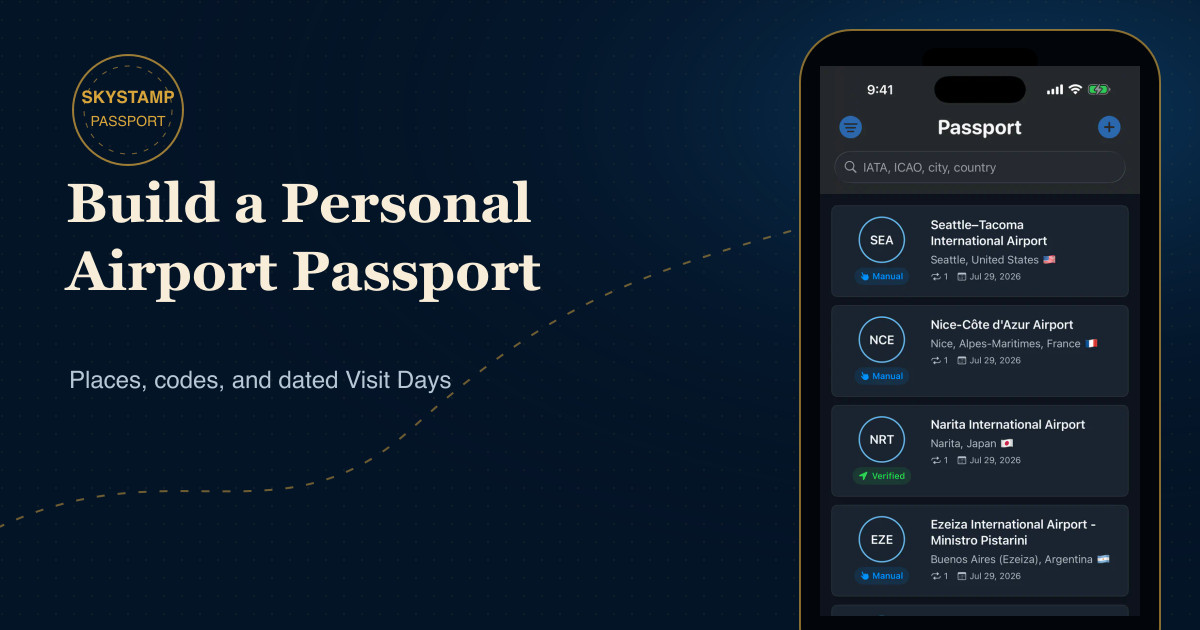
A personal airport passport is a record of places rather than schedules. It can remind you where a first solo trip began, which airport became a familiar connection, or how often you returned to a city. The most durable version is simple: decide what counts as a visit, keep the date, and use the airport’s code as a stable way back to the memory.
Start with the places, not the flights
Flight numbers, gates, and departure times change. An airport identity is much steadier. SkyStamp is designed around that distinction: it is a private airport collection app, not a live flight tracker, delay service, pilot logbook, or airline operations tool.
In SkyStamp, one airport becomes one Passport Entry. Each time you return, you add a dated Visit Day inside that entry instead of creating another copy of the airport. This keeps the collection readable while preserving repeat visits.
Choose a rule you can keep
There is no universal collecting rule. Some people count only airports where they entered or left the terminal. Others include connections. What matters is consistency. Before backfilling years of travel, answer three questions:
- Do connections count, or only origins and destinations?
- Will you use local calendar dates for overnight journeys?
- How will you handle multiple visits to the same airport on one day?
SkyStamp stores at most one Visit Day per airport per calendar day. If you return on a later date, the existing Passport Entry gains another Visit Day. That model is useful because it separates airports collected from total visits.
Use codes as anchors, then add geography
Airport codes are compact anchors, but geography gives them meaning. SkyStamp’s Passport search accepts IATA codes, ICAO codes, city, and country. If you remember “Tokyo” but not whether you used HND or NRT, geography can lead you back to the right airport. If an old itinerary shows only a code, search works in the other direction.
Be careful with city labels. One metropolitan area can have several airports, and an airport’s official name may refer to a municipality outside the city it serves. Check the airport name and location together before saving a past visit.
Build the first version in one calm session
- Begin with recent trips. They are easiest to verify from photos, calendars, or tickets you already own.
- Add the obvious airports first. Home airports and recurring destinations create the backbone of the collection.
- Enter past dates manually. SkyStamp lets you choose an airport and add one or more unique Visit Days.
- Review ambiguous cities. Confirm the airport code rather than assuming the largest airport in the region.
- Let future visits accumulate naturally. A nearby supported-airport suggestion is never collected until you confirm it.
You do not need a perfect historical archive on day one. A trustworthy smaller passport is more valuable than a large list built from guesses.
Keep the collection private and maintainable
SkyStamp’s core airport collection works offline and does not require an account. Confirmed collection data is stored on your device, and raw location history is not stored or uploaded. Map imagery and current weather can require a connection, but collecting, searching, reviewing, and quizzing are local-first activities.
Periodically review your Passport and map, correct a date if needed, and remove an entry that does not match your rules. The goal is not to compete with anyone else. It is to build a record you will still understand years from now.
Turn the passport into a memory practice
Codes become more memorable when you connect them to a place and a moment. After adding an airport, pause long enough to recall the city, the reason for the trip, and whether it was a first visit or a return. Then try the airport-code and city-matching guide to reinforce the geography behind the collection.